

 | Modding |
Unity does not have any modding system of its own. The traditional way of allowing modding with Unity is to load asset bundles from external sources and override game assets and scripts from there. This has the benefit of handling everything through Unity, but makes the actual process of modding quite a bit harder as any potential modder has to have an installation of Unity compatible with your game and be familiar with it to be able to create a mod. Which is one of the reasons most Unity games with good modding support don’t go this route and implement custom modding tools & systems.
This topic contains the following sections:
 System
Any modding system has to contend with two types of resources:
Assets such as textures, sounds, and configuration files to allow modding of in-game look-and-feel.
Scripts to add new features or modify existing functionality.
The modding system integrated into the kit supports both.
Assets
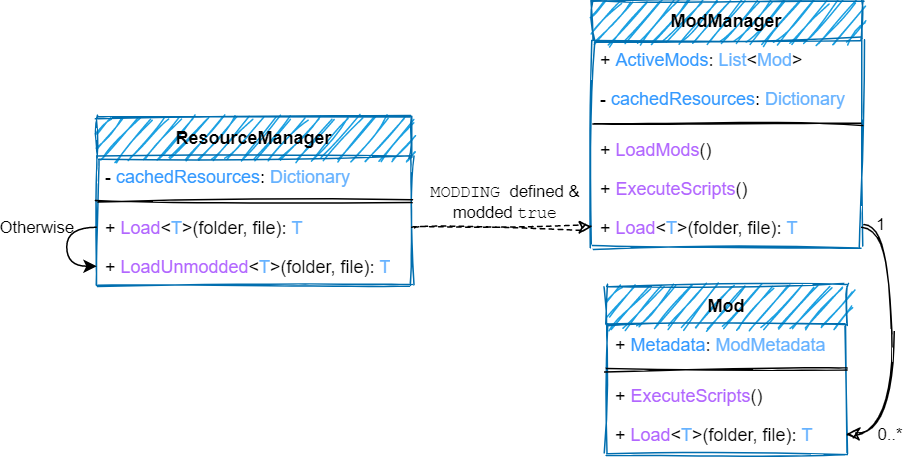
Our modding system achieves the former by hooking into ResourceManager. ResourceManager is the global center where all in-game assets can be conveniently loaded and should be the class you use to load everything. Before looking for assets in the game ResourceManager asks ModManager if any of the loaded mods have the asset being requested. If that is indeed the case, the mod version is loaded instead.
 Note Note |
|---|
If you want, you can force the game version by passing false for the modded parameter in a ResourceManager.Load call, or you can change DefaultModding to false altogether if you only want modding for very few files. |
Scripts
For scripting, the kit provides full Lua support through XLua. A mod just has to provide a list of .lua scripts it wants to execute. The scripts have full access to your game (with the CS namespace) and Unity (with the UnityEngine or UE namespace) and can do pretty much everything. They also support code injection whereby they can modify the functionality of existing methods.
| Tip |
|---|
You can restrict access by configuring Kit/Modding/Scripting/Editor/ScriptingConfig.cs. |
The system supports all platforms including mobile. You have to generate code by pressing Menu → XLua → Generate Code for mobile platforms to resolve AOT issues.
All of the modding functionality is only compiled if MODDING is defined in Project Settings → Player → Scripting Define Symbols. This not only ensures that modding for a game can be enabled or disabled at the flip of a switch but also that if modding support is not needed, the code is not packaged into the game to prevent abuse. Remove the MODDING symbol definition if you don't want modding.
ModsMod-loading is done just by calling ModManagerLoadMods(Boolean)/ ModManagerLoadModsAsync(Boolean) methods, whereby the game will look for mods in pre-defined locations (generally inside a Mods folder within the base game folder) and load them.
The system supports loading mods from 3 different formats:
Folders – You create a folder and place your mod contents inside it.
Archives – You compress your mod contents inside a .zip file.
Asset bundles – You create an asset bundle of your assets.
However a modder chooses to package a mod, it just needs to be placed inside the Mods folder. Individual mods can also be enabled or disabled within the game once the system is able to detect them. Their execution order can also be configured in the game. See ModWindow.
A mod will typically have the following structure:
Path | Requirement | Description |
|---|---|---|
Metadata.json | Mandatory | Mod metadata and configuration in the form of a Json file. |
Resources/ | Optional | Game assets to replace in a Resources folder. |
StreamingAssets/ | Optional | Game assets to replace in the streaming assets folder. |
PersistentData/ | Optional | Game assets to replace in the persistent data folder. |
Data/ | Optional | Game assets to replace in the base game folder. |
*.lua | Optional | Lua scripts. |
Any paths/files placed inside Resources, StreamingAssets, PersistentData, and Data folders inside a mod directly override the version base game provides. So, for example, if you have a Mod1/Resources/Backgrounds/Background1.jpg, and the game calls ResourceManager.Load<Texture>(ResourceFolder.Resources, "Backgrounds/Background1") the mod version will be loaded.
The mod Metadata.json provides the following information in the Json format.
- Name:
Name of the mod.
- Version:
Mod version.
- Author:
Mod author.
- Description:
A short description of the mod.
- Persistence:
A mode for executing Lua scripts.
None – Just execute them and then destroy the scripting environment.
Simple – Execute them, create a SimpleDispatcher for the mod to run co-routines with, and keep the scripting environment until the mod is unloaded.
Full – Execute them, create a FullDispatcher for the mod, hook awake/start/update/... methods from scripts with the dispatcher, and keep the scripting environment until the mod is unloaded.
- Scripts:
Relative paths to .lua files to execute, in the order they should be executed.
Here is a sample Metadata.json:
{
    "Name": "Mod 1",
    "Version": "v1.0",
    "Author": "Mod 1 Author",
    "Description": "Mod 1 Description",
    "Persistence": "None",
    "Scripts":
    [
        "Script1.lua"
    ]
}ScriptingThe Lua keyword self in each script is bound to the Mod, so you can do stuff like self:Load("Texture.jpg") or print(self.Name) within a script. There are also built-in methods (see Resources/Lua/Modding.lua.txt):
- startCoroutine(function)
Start a co-routine with the dispatcher created for the mod.
- yield(function)
Yield a function from a co-routine.
- invoke(function, time)
Call a function after time seconds.
- invokeRepeating(function, time, interval)
Call a function after time seconds, and keep calling it after interval seconds.
- schedule(type, function)
Schedule a function for update, fixedUpdate, or lateUpdate.
- inject(type, method, function)
Inject a function's code into the method of a type.
- inject(type, method, extend, function)
Inject a function's code into the method of a type. If extend is false, it's less overhead but you can't call the base method from the script (Default: true).
 Important Important |
|---|
Do set the persistence to Simple or Full if you call these methods. |
See Also