

 | Pooler |
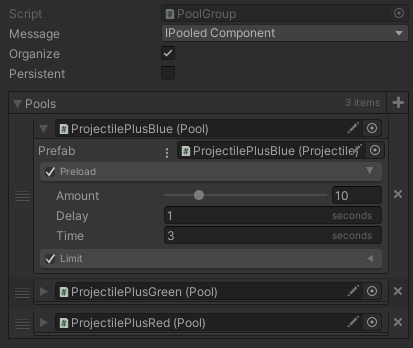
Object pooling or just pooling in game development is the concept of pre-loading objects... or at-least not destroying them completely after they're used. Instantiate and Destroy are costly methods in Unity, and have a lot of impact on the CPU and Garbage Collector. By de-activating instead of destroying objects we're going to need more copies of anyway, we avoid the cost of Instantiate/Destroy, prevent stutters, and make the game smoother. The text-book example would be projectiles in a 2D-shooter. A Pooler is a system that facilitates this task. Typically it involves calling SetActive on GameObjects for re-using and destroying pool instances. Instantiate is called only when there are no more objects in the "re-use" list. There also needs to be a messaging system so that pool instances are informed of these events and can manage themselves accordingly. The pooling system in the kit provides the functionality in an inspector-friendly manner, and is quite efficient & easy-to-use. It also supports:
|  |
 System
The class Pooler is the central hub of the system. It provides access to adding, querying, and removing instances, pools, and groups. For every different prefab, a separate Pool object is created, which can be (optionally) grouped together into PoolGroups. The pool keeps track of all instances being used and those that are available.
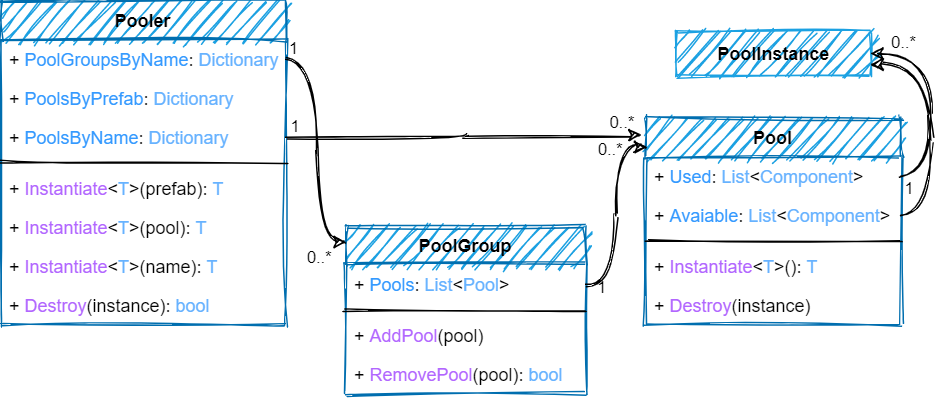
The most basic use-case of the Pooler and the easiest way to use it is to just replace Object.Instantiate() calls with PoolerInstantiate and Object.Destroy() calls with PoolerDestroy. If your instances don't require much tuning, everything would just work by itself. Typically though, that is not the case and you need to move Awake and OnDestroy code in your scripts that requires re-initializing into AwakeFromPool and OnDestroyIntoPool. If you need more control over the configuration of a pool, you can either create one either through code or add Pool to a GameObject in the scene. You can likewise (optionally) group pools through code or by attaching PoolGroup in the inspector. All the configuration features are then exposed as properties of a Pool.
See Also