

 | Console |
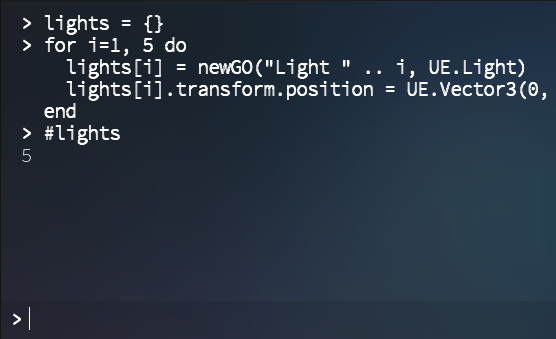
There is a custom in-game Console integrated into the kit that can be brought up by pressing tilde (~) on PC or flicking down on mobile. The console displays all Log messages and supports scripting in Lua. This should come in handy in situations where you want to debug or tweak the game. There is no need to bind commands to the console — it has full access to your game code. XLua does, however, require classes to be referred to by their fully-qualified name, starting with CS. So GameObject("MyObject") or DataManager.GameData will not work but CS.UnityEngine.GameObject("MyObject") and CS.Game.DataManager.GameData will. To ease the pain of typing CS. over and over again, labels System, UE, Kit and Game have been bound to CS.System, CS.UnityEngine, CS.Kit and CS.Game respectively (see Resources/Lua/General.lua.txt) so UE.GameObject("MyObject") and Game.DataManager.GameData will work just as well.
|  |
 Built-in Commands
- expression
Evaluate and output the value of the expression.
- statement
Execute the statement.
- print(expression)
Same as typing the expression.
- list(type)
List all public methods, properties, and fields associated with a type.
 Tip
TipUse this when you're not sure about the class structure or which member to access.
- cls() / clear()
Clear the log.
- go(path)
Get the GameObject at the specified scene path. Uses GameObject.Find.
- go(path, type)
Get the specified component of the GameObject at the given scene path. Uses GameObject.Find.
- go(type)
Get the first component of the given type.
- gos(tag)
Get the GameObjects with the given tag.
- gos(type)
Get the components with the given type.
- newGO(name, ...)
Create a new GameObject with the given name and list of components.
- instantiate(path)
Create an instance of the prefab at path.
- destroy(object)
Destroy the given object.
- destroy(array)
Destroy all the array objects.
- destroy(path)
Destroy the GameObject at path.
- destroy(path, type)
Destroy the given component of the GameObject at path.
- destroy(type)
Destroy the first component of the given type.
Keyboard ShortcutsKeys | Action |
|---|---|
Enter | Submit command. |
Shift + Enter | New line. |
Up | Previous command. |
Down | Next command. |
Shift + Up | Move up. |
Shift + Down | Move down. |
See Also